 Hypergol
T-0 · For Mac and Windows
AI teammates that work for you, and answer to you.
Hypergol turns the AI subscription you already pay for into a crew that remembers your work, takes on jobs by itself, and checks with you first.
An address, not an account. The download starts on the same click.
- Drafting the release note
Beacon
Content lead
- Next wake 2:00 pm
Girder
Platform engineer
- Waiting on you
Anvil
Release engineer
Anvil wants to run a command — push the release branch
git push origin release/2.1
in ~/Hypergol/work/app
Asks first
Outside its clearance, a crew member waits for you
Shows its work
Audit and Activity keep every answer and run
No middleman
No account, no telemetry, and your work never passes through us
Your subscription
Claude Code, Copilot, Codex, Antigravity
Ignition
Two parts. One ignition.
Hypergolic propellants ignite the moment they meet: no spark, no igniter. Hypergol brings no model of its own and adds no bill. Sign in to an AI you already pay for, and your first crew is one sentence away.
Subscriptions
- Claude Code
- GitHub Copilot
- Codex
- Antigravity
On your computer
- Ollama
- LM Studio
Or a key
- Anthropic
- Gemini
- OpenRouter
- OpenAI
- Named crew, each with its own memory
- A clearance for each, and a gate you answer
- Missions, flight plans and triggers
- Audit, budgets and Put back
Beacon
on Claude Code
Girder
on Codex
Anvil
on GitHub Copilot
Ledger
on Antigravity
Sequence
From a sentence to a crew
01
Describe the job
Tell the Crew Builder what you need done, in a sentence: “Keep the release notes drafted, and tell me when one is at risk.”
02
Approve the crew
It proposes the crew on one card: names, jobs, models, and what each may touch. Change anything, then allow it.
03
It works, and asks
The crew takes on the work, wakes on its own schedule, and stops at a card whenever it needs something outside its clearance.
Crew
A crew, not a chat window
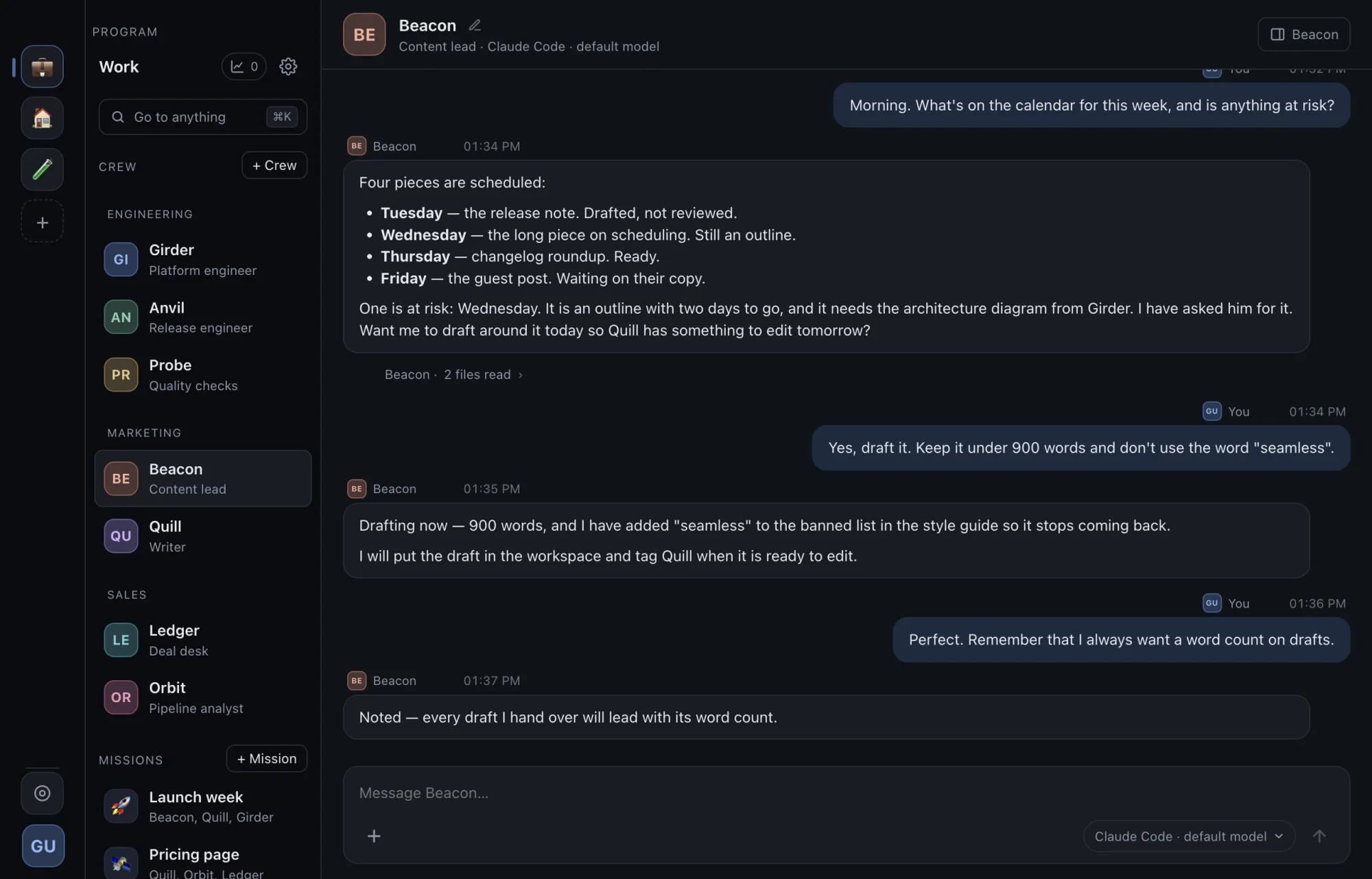
A chat window forgets you when you close it. A crew member keeps its job, its memory and its folder, runs on the model you pick for it, and is still there tomorrow.
Beacon
Content lead
- Runs on
- Claude Code
- Remembers
- Every draft leads with its word count
- Clearance
- Shell: askWeb: askNotion
Girder
Platform engineer
- Runs on
- Codex
- Remembers
- Staging deploys go out after 2 pm
- Clearance
- Shell: allowGitHub: issuesSentry
Anvil
Release engineer
- Runs on
- GitHub Copilot
- Remembers
- Tag only after Probe's checks pass
- Clearance
- Shell: askGitHub: releases
Ledger
Deal desk
- Runs on
- Antigravity
- Remembers
- Discounts over 15% go to you
- Clearance
- Files: askBrowser: askStripe: read
Missions
Put two to six crew members in a room with a purpose. They take turns, call on each other by name, and tag you when something needs a person.
Programs
Work and Personal are separate programs, each with its own crew, tools, secrets and rules. Nothing crosses from one to another.
Flight plans
Work that starts without you
Crew wake on a schedule, when a file lands in a folder, when a GitHub issue opens, or when someone writes in Slack. Budgets keep every day inside the limits you set.
- 07:00
Beacon Flight plan
Every weekday: draft the day's posts
- 09:00
Ledger Flight plan
Mondays: the pipeline report, to you
- 11:42
Ledger Trigger
receipt-0193.pdf landed in Inbox
- 14:15
Girder GitHub
Issue #212 opened: “Staging deploy fails”
- 16:30
Anvil Slack
#release: “Is 2.1 ready to tag?”
Wants to run a command: waiting on you
- Wakes today
- 5
- Most wakes in an hour
- 6 per crew member
- Tokens today
- 412k of 5M
- Waiting on you
- 1
Cap the wakes of each crew member and of the whole program, and the tokens a program spends in a day.
Clearance
Every action passes a gate you answer
Each crew member has a clearance: what it may run, read, write and reach. Anything outside it stops at a card in the conversation, and nothing happens until you answer. Audit keeps every answer, and why.
- It asks first
- A new crew member asks before it runs a command, writes outside its own folder or opens a new website, and has no connectors or browser until you grant them.
- Your answers stick
- Always and Never become the program's rules, so you stop answering the same question twice.
- Changes can be put back
- When a crew member edits a file outside its folder, Hypergol keeps what was there, and Put back restores it.
- Some things always ask
- In the built-in browser, paying, sending, posting, deleting or changing an account asks every time. No setting turns that off.
- Spending has a ceiling
- Cap how often each crew member wakes in an hour, and how many tokens a program spends in a day.
- On a Mac, the system closes the door too
- macOS's own sandbox closes Hypergol's folder, where the rules and secrets are kept, to a crew member's commands. On Windows, the gate is the boundary.
Privacy
What stays on your computer, and what goes
The app hosts nothing, so there is nothing of ours for your work to pass through. This is exactly where your work does go.
Stays · on your disk
- Your crew, their memory and every conversation
- Their folders and the files in them
- Your secrets, encrypted
- Your rules, and the record of every answer
Goes · where you point it
- The conversation, the crew member's memory and the files you attach, to the AI you chose for it
- Tool calls, to the connectors you added
- Messages, to Slack, if you connected it
- Visits, to the websites you let a crew member open
- A daily check for a new version, to our download host: it carries nothing about you, and you can turn it off
Never
- Your work, to us. There is no Hypergol account, and nothing you do passes through a server of ours
- No analytics, no crash reports, no usage pings
Network activity, in each program's settings, lists where that program can send anything: the models in use, the connectors and who may call them, Slack, and what Hypergol itself sends, which is nothing.
This website is the one thing of ours that keeps anything: the email address you give it, so we can send you the app and news about it. Nothing else, and no tracking.
Next to a coding CLI
What a crew adds to the assistant you already use
Hypergol runs on the same logins as Claude Code, Copilot, Codex and Antigravity. It adds who, when and what may be touched.
| Aspect | A coding CLI on its own | Hypergol |
|---|---|---|
| Who you talk to | One assistant per terminal window | Named crew members that persist, each with a job and its own memory |
| Memory | Per session or per project | Per crew member, recalled across conversations, kept inside one program |
| What it may touch | Whatever your account can reach | A clearance per crew member; anything else asks you first |
| Working together | You copy answers between windows | Missions, handoffs between crew members, @mentions |
| Acting on its own | You start every run | On a schedule, when a file lands, on a GitHub issue or a Slack message |
| Models | The one your tool is signed in to | A provider and model per crew member, mixed across your subscriptions |
| Cost control | Limits per tool | One usage ledger across providers, wake budgets, a daily token ceiling |
FAQs
Before you ask
T-0
Put a crew to work
Leave your email and pick your computer. The download starts as soon as you do.
An address, not an account. The download starts on the same click.